
Most slow WordPress sites can be made faster with good hosting, caching, image optimisation and fewer plugins. Real-user data shows the problem is usually loading speed: in September 2026 only 55.4% of WordPress sites had a good Largest Contentful Paint on mobile, and 48.3% passed all Core Web Vitals. If your site still fails after the basics, or relies on a heavy page builder and dozens of plugins, a rebuild is often the cheaper long-term choice.
A slow WordPress site costs you customers you never see. People tap a link, wait, and go back to Google to try the next result. They do not send a complaint. They just leave.
The good news is that most WordPress sites can be made noticeably faster. The less comfortable news is that some cannot be made fast enough without starting again. This guide shows you how to tell which situation you are in, what WordPress speed optimisation actually involves, what it costs, and when a rebuild is the better investment.
How fast are WordPress sites, really?
Google measures real visitors’ experience with three Core Web Vitals: how quickly the main content appears (LCP), how quickly the page responds to taps (INP) and how stable the layout is while loading (CLS).
The HTTP Archive’s Core Web Vitals Technology Report shows how WordPress sites performed for real mobile visitors in September 2026:
| Core Web Vital (mobile, Sept 2026) | WordPress sites with a good score |
|---|---|
| LCP: loading speed | 55.4% |
| INP: responsiveness | 90.3% |
| CLS: visual stability | 87.3% |
| Pass all three | 48.3% |
Source: HTTP Archive Core Web Vitals Technology Report, 2.66 million WordPress websites measured on mobile.
This tells you something useful. WordPress sites usually respond well to taps and keep a stable layout. Their real problem is loading speed. Almost half of them take too long to show their main content on a phone. So that is where optimisation effort should go first.
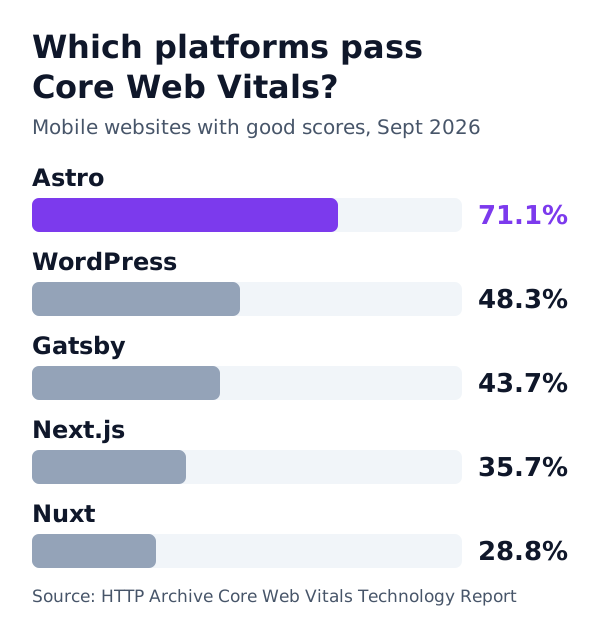
For comparison, 71.1% of sites built with Astro passed in the same month. More on that later.
Why WordPress sites get slow
WordPress itself is not slow. What slows it down is everything that piles up around it over the years.
1. Hosting
Cheap shared hosting puts your site on a crowded server. Every visit waits while WordPress builds the page from the database. This shows up as a slow first response before anything else can start.
2. No proper caching
Without page caching, WordPress rebuilds every page for every visitor. With caching, it serves a ready-made copy almost instantly.
3. Images
Large photos uploaded straight from a phone or camera are one of the most common causes of slow loading. A single hero image can weigh more than the rest of the page combined.
4. Plugins
Each plugin can add its own scripts and styles to every page, even pages where it does nothing. Thirty or forty plugins quietly add up.
5. Page builders and heavy themes
Visual page builders make editing easy, but many produce large amounts of code and nested layout markup. Multipurpose themes often load features you never use.
6. Third-party scripts
Chat widgets, tracking tags, booking widgets, social feeds, embedded maps and video players each load code from other servers. They are often the hidden reason a site that “should” be fast is not.
How to check your WordPress site’s speed
Before changing anything, measure. It takes ten minutes.
- PageSpeed Insights (pagespeed.web.dev): enter your homepage and a key service page. Look first at the field data at the top, which shows real visitors, then at the lab report for specific problems.
- Google Search Console: the Core Web Vitals report groups your pages into good, needs improvement and poor, based on real visitors.
- Test on a real phone, on mobile data, not office Wi-Fi.
Write down the LCP, INP and CLS numbers. You will compare them after each fix.
WordPress speed optimisation: the fixes that work
Work through these in order. The first few usually deliver most of the improvement.
Step 1: Fix the hosting
Move to good managed WordPress hosting or a well-configured server, with a modern PHP version and server-level caching. If your server takes more than about 600 milliseconds to start responding, no other fix will fully compensate.
Step 2: Turn on page caching and a CDN
Use page caching, from your host or a reputable caching plugin, so visitors get ready-made pages. Add a content delivery network so files are served from a location near each visitor.
Step 3: Optimise images
- Resize images to the size they are actually displayed at.
- Convert them to modern formats such as WebP or AVIF.
- Lazy-load images below the first screen, but never the main hero image.
- Give every image a width and height so the layout does not jump.
This step alone often fixes a failing LCP.
Step 4: Cut the plugins
List every plugin and ask what it does for your business. Remove the ones you do not need, and replace several small plugins with one well-built one where possible. Check that the remaining plugins only load their files on pages that use them.
Step 5: Lighten the theme and page builder
If your theme or page builder adds a lot of code, consider a lightweight theme and simpler layouts for key pages. This is often the biggest improvement, and also the biggest piece of work.
Step 6: Control third-party scripts
Remove scripts you no longer use. Delay the rest until after the page has loaded or until a visitor interacts. A chat widget does not need to load before your headline appears.
Step 7: Fonts and CSS
Host fonts yourself, load only the weights you use, and remove unused CSS where your tools allow it.
Step 8: Measure again and keep it fast
Re-test after each change. Then keep it that way: new plugins, big images and extra tracking tags will slowly undo the work if nobody watches.
Hosting types explained in plain English
Hosting is the foundation, so it is worth knowing what you are paying for.
| Hosting type | How it works | Typical fit |
|---|---|---|
| Shared hosting | Your site shares one server with hundreds of others | Very small sites with little traffic; often the cause of slow sites |
| Managed WordPress hosting | A host that tunes servers, caching and updates for WordPress | Most business WordPress sites |
| VPS or cloud server | Your own virtual server that someone must configure and maintain | Larger sites with technical support |
| Static hosting or CDN | Pre-built pages served from locations worldwide | Static sites, such as those built with Astro |
Moving from cheap shared hosting to good managed hosting is often the single biggest improvement for a WordPress site, and one of the cheapest.
WooCommerce: why online stores need extra care
WooCommerce turns WordPress into an online store, and stores are harder to make fast. Cart and checkout pages cannot be cached the same way as normal pages, product catalogues bring many images, and stores often add extra plugins for payments, shipping, reviews and marketing.
If you run WooCommerce:
- Use hosting built for WooCommerce, with object caching.
- Keep product images compressed and consistently sized.
- Load cart and checkout scripts only on the pages that need them.
- Review every marketing and tracking script, which tend to pile up on stores.
- Test the product page, the category page and the checkout, not just the homepage.
Example: a slow service business website
Here is a typical case. A local service business runs a WordPress site built six years ago with a popular page builder and about 35 plugins. On mobile, the main content takes far too long to appear, and the site fails Core Web Vitals. Enquiries have dropped.
The first round of work moves the site to managed hosting, turns on caching and a CDN, compresses and resizes images, and removes 15 plugins that were no longer used. Loading improves clearly, but the key service pages still fail on mobile because the page builder produces heavy layouts.
At this point the owner has a choice: spend similar money rebuilding the page-builder templates, or rebuild the site on a faster, simpler stack with a fresh design. Because the design also looked dated, a rebuild was the better investment. The new site passes Core Web Vitals and needs far less maintenance.
Your site may be simpler or more complex, but the pattern is common: the quick wins help, and the page builder decides whether optimisation is enough.
How long does WordPress speed optimisation take?
- Quick clean-up: usually one to three days.
- Full optimisation: one to three weeks, depending on the theme, plugins and number of templates.
- Seeing results in Google: the Core Web Vitals report in Search Console uses 28 days of real-user data, so improvements take about a month to show fully.
Questions to ask a speed optimisation provider
- Will you measure real-user data, or only lab scores?
- What exactly will you change, and can it be undone?
- Which plugins will you remove or replace, and will any features stop working?
- How will you keep the site fast after you finish?
- If optimisation is not enough, will you tell me honestly?
What WordPress speed optimisation costs
Prices vary by site and region, but as a rough guide:
| Level of work | What it covers | Typical cost |
|---|---|---|
| Quick clean-up | Hosting check, caching, image optimisation, plugin review | A few hundred dollars |
| Full optimisation | All of the above, plus theme and script work and Core Web Vitals fixes on key pages | Roughly $500 to $2,000 |
| Page-builder rework | Rebuilding key templates without a heavy builder | Can approach the cost of a new site |
Beware of anyone who promises a perfect score in an afternoon. Lab scores can be pushed up with tricks that do not help real visitors. What matters is the field data from real visitors in Search Console.
Fix it or rebuild? How to decide
Optimisation is the right choice when:
- The site’s design and content still work for your business.
- It uses a reasonably light theme and a modest number of plugins.
- The basic fixes above bring Core Web Vitals into the green.
A rebuild is usually the better investment when:
- The site still fails Core Web Vitals after hosting, caching and images are fixed.
- It is built with a heavy page builder that generates bloated code.
- It needs constant plugin, theme and security updates to stay running.
- It has been hacked before, or you worry about security.
- A redesign is due anyway, because the site looks dated or no longer converts.
Ask one simple question: will I spend more over the next three years patching this site than replacing it? For many small business sites built five or more years ago, the honest answer is yes.
What a rebuild looks like today
A modern rebuild does not have to mean another WordPress site. For most business websites, we now use Astro, a framework that turns pages into plain, fast HTML and loads JavaScript only where it is needed.
The difference shows up in real-user data: in September 2026, 71.1% of Astro sites passed Core Web Vitals on mobile, against 48.3% of WordPress sites. A static site also has no database or plugins to attack, and costs very little to host.
You do not have to give up easy editing. Your team can update content through a simple content management system, or even keep WordPress purely as a writing tool behind a fast front end. If you are curious about the trade-offs, read Astro vs WordPress for small business and how to migrate from WordPress to Astro without losing SEO.
Common WordPress speed mistakes
- Stacking optimisation plugins. Two caching plugins fight each other. Choose one good tool.
- Chasing a lab score. A 100 in a single lab test means little if real visitors still wait.
- Lazy-loading the hero image. It delays the very content Google measures for LCP.
- Ignoring mobile. Most visitors are on phones, and that is where WordPress sites struggle most.
- Fixing once and forgetting. Speed slips back as content, plugins and scripts are added.
A quick checklist
- Measure LCP, INP and CLS in PageSpeed Insights and Search Console
- Good hosting with server response under about 600 ms
- Page caching and a CDN enabled
- Images resized, compressed and in WebP or AVIF
- Unused plugins removed
- Heavy theme or page builder reviewed
- Third-party scripts delayed or removed
- Fonts self-hosted, unused CSS reduced
- Results re-measured, and monitored monthly
Optimise first, rebuild if it still fails
Most slow WordPress sites can be made faster with better hosting, caching, image optimisation and fewer plugins. Start there, measure honestly, and focus on loading speed, where WordPress sites struggle most.
If the site still fails, or keeps you busy with updates and patches, a rebuild is often the smarter investment. Not sure which applies to you? Our web development team can review your site and tell you honestly whether to optimise or rebuild, and our small business websites start at $1,000.
Frequently asked questions
Why is my WordPress site so slow?
The most common causes are cheap shared hosting, no page caching, large uncompressed images, too many plugins, heavy page builders and third-party scripts such as chat widgets and tracking tags. Usually several of these add up.
How much does WordPress speed optimisation cost?
A basic clean-up (hosting check, caching, images and plugin review) is usually a few hundred dollars. Deeper work on a site built with a heavy page builder can cost as much as a new site, which is when rebuilding becomes worth comparing.
Can a WordPress site pass Core Web Vitals?
Yes, many do. In September 2026, 48.3% of WordPress sites passed all three Core Web Vitals on mobile. Sites on good hosting, with a lightweight theme and few plugins, have the best chance.
Do caching plugins fix a slow WordPress site?
They help a lot with server response time, but they cannot fix oversized images, heavy themes or too much JavaScript. Caching is one step, not the whole solution.
Should I rebuild my WordPress site instead of optimising it?
Consider a rebuild if the site still fails Core Web Vitals after the basic fixes, depends on a heavy page builder, needs constant plugin updates, or is due for a redesign anyway. A fast static site is often cheaper to run over three years.
Will speeding up my site improve Google rankings?
It can help, especially on mobile, because page experience is part of how Google evaluates pages. The bigger gain is usually in conversions: faster pages keep more visitors and turn more of them into enquiries.