
Astro vs Next.js comes down to what you are building. For marketing sites, blogs, service businesses and content-heavy websites, Astro is usually the better choice: it ships far less JavaScript, and in September 2026 71.1% of Astro sites passed Google's Core Web Vitals on mobile, against 35.7% of Next.js sites. For web apps with logins, dashboards and lots of interaction, Next.js is the stronger fit.
Astro vs Next.js is one of the most common questions we hear from businesses planning a new website. Both are modern, well-supported frameworks, and both can produce a fast site. But they were built for different jobs, and picking the wrong one shows up later as slow pages, higher hosting bills or a site that is harder to change than it should be.
This guide compares them for business websites: real performance data, SEO, how each handles JavaScript, content editing, hosting and cost, and clear advice on when each one is the right call.
The short answer
If you are building a marketing website, a blog, a service business site or anything where most pages are content, Astro is usually the better choice. It is faster by default and easier to keep fast.
If you are building an application, such as a customer portal, a dashboard or a product where people log in and interact all the time, Next.js is usually the better choice.
Most business websites are the first kind. That is why Astro has become the default for so many of them.
What the real-world data says
Opinions are easy to find. Real-user data is more useful.
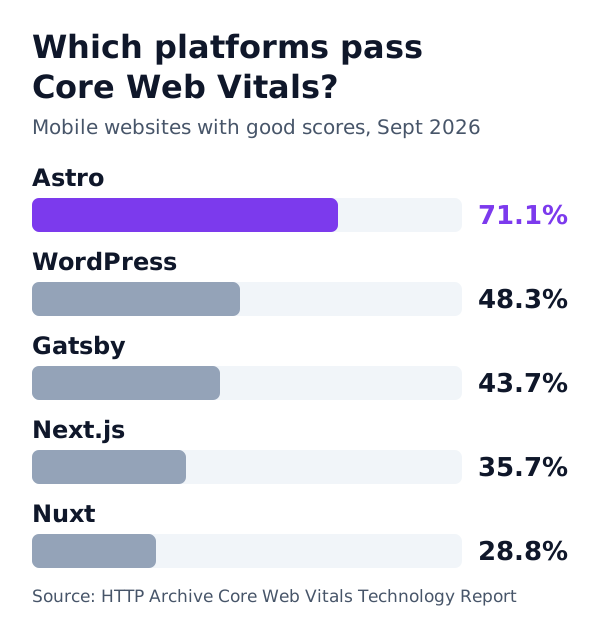
The HTTP Archive’s Core Web Vitals Technology Report combines Google’s Chrome UX Report (speed measured on real visitors’ phones and computers) with detection of the technology each site is built on. Here is the share of mobile websites that passed all three Core Web Vitals in September 2026:
| Metric (mobile, Sept 2026) | Astro | Next.js |
|---|---|---|
| Pass all Core Web Vitals | 71.1% | 35.7% |
| Good LCP (loading) | 81.1% | 53.5% |
| Good INP (responsiveness) | 85.0% | 59.7% |
| Good CLS (visual stability) | 93.6% | 73.5% |
| Sites measured | 47,277 | 395,345 |
Source: HTTP Archive Core Web Vitals Technology Report, mobile origins, September 2026.
Two things stand out. Astro sites are roughly twice as likely to pass on mobile, and the gap shows up in every metric, not just one.
A fair caveat: this compares the average site on each framework, not what a skilled team can do. Next.js powers many large, complex applications that are harder to make fast than a simple content site. A carefully built Next.js site can pass Core Web Vitals. The data simply shows that Astro makes the fast result the normal one.
Why Astro is usually faster
The difference comes down to one design decision: how much JavaScript reaches the visitor’s browser.
Astro: HTML first, JavaScript only where needed
Astro builds pages into plain HTML. By default, it sends no JavaScript at all. When a part of the page needs to be interactive, such as a booking form, an image gallery or a pricing toggle, you mark that one component, and Astro loads JavaScript for it alone. Astro calls these “islands”.
The rest of the page stays static HTML, which phones can display almost instantly.
Next.js: React for the whole page
Next.js is built on React. Pages are rendered on the server or at build time, then React “hydrates” them in the browser, which means it downloads JavaScript and takes control of the page so it can respond to clicks.
Recent versions use React Server Components, which reduce how much JavaScript is sent. That helps a lot. Even so, a Next.js page usually carries the React runtime and more code than the same page in Astro. On a fast laptop you will not notice. On a mid-range phone on mobile data, you often will.
Why this matters for real visitors
Most business website visitors arrive on a phone, often from Google or social media. They decide in seconds whether to stay. A page that shows its content quickly and responds straight away keeps more of them. Every second of delay on mobile costs enquiries, bookings and sales.
Astro vs Next.js for SEO: which ranks better?
Neither framework ranks a site on its own. Content, links, reputation and relevance still decide most of the result. But the technical foundation matters, and here the two differ.
Where they are equal:
- Both render full HTML that search engines can read.
- Both give you complete control over titles, meta descriptions, canonical URLs and structured data.
- Both can generate sitemaps and handle redirects.
Where Astro has the edge:
- Speed by default. Core Web Vitals are part of Google’s page experience signals. Passing them is easier when pages are light.
- Less to go wrong. With less JavaScript, there are fewer chances for content to load late or for a script to block rendering.
- AI search. AI assistants and search features read pages as text. Clean, fast HTML with clear structure is easy for them to understand and quote.
Where Next.js needs more care:
- Keep client-side JavaScript small, and use server components wherever possible.
- Watch third-party scripts, large images and fonts, which hurt both frameworks but add up faster on a heavier page.
- Test real mobile performance, not just a fast desktop.
If SEO is a main goal and the site is mostly content, Astro gives you a head start.
Content editing
This is the question most business owners ask first: “Can my team update the website without a developer?”
Both frameworks can do this well, because neither forces a particular editor. You connect a content management system (CMS).
- Headless CMS: Sanity, Contentful, Storyblok and others work with both. Editors get a friendly interface, and the site updates when they publish.
- Markdown files: Astro has excellent built-in support for content collections, ideal for blogs and resource libraries.
- WordPress as an editor: some businesses keep WordPress only for writing, and feed content into an Astro or Next.js front end.
So editing is rarely the deciding factor. Choose the framework for the site you are building, then choose the editor your team will find easiest.
Astro vs Next.js: hosting and running costs
Running costs are where the difference becomes very practical.
Astro usually builds a fully static site: a folder of files. You can host it on almost any web host or CDN, often for free or very little. There is no server to patch, no database to secure and very little that can break at 2am.
Next.js sites that use server rendering, API routes or image optimisation need a host that runs Node.js. Vercel, the company behind Next.js, makes this easy, and many other hosts support it. Costs grow with traffic and with how much work the server does per visit.
Astro can also run server code when you need it, for example for a form or a members’ area, using an adapter for your host. But for most business websites, a static build is all you need.
| Astro (static) | Next.js (server-rendered) | |
|---|---|---|
| Typical hosting | Any static host or CDN | Node.js host or Vercel |
| Hosting cost for a small business site | Free to low | Low to moderate |
| Ongoing maintenance | Very little | Framework and server updates |
| Security exposure | Very small: no server or database | Larger: server code to keep updated |
Astro vs Next.js: developer experience
Both are pleasant to work with, and both are actively maintained by large communities.
Astro is easier to learn for anyone who knows HTML and CSS. Its components look like HTML with a little JavaScript at the top. You can still use React, Vue or Svelte components inside it, which makes it easy to reuse existing work.
Next.js is the natural choice for teams already deep in React. It has a huge ecosystem, many hiring options and strong tooling for complex applications, including routing, data fetching, caching and server actions.
For a business, the important point is maintainability. A site your team or your agency can change safely, quickly and cheaply is worth more than any framework feature.
When to choose Astro
Astro is usually the right choice when:
- Your site is mostly pages people read: services, case studies, blog posts, landing pages.
- Speed on mobile and Google rankings are priorities.
- You want low hosting costs and little maintenance.
- Interactivity is limited to a few parts of each page, such as forms, sliders or calculators.
- You are moving away from a slow WordPress site and want a fast rebuild.
Typical examples: service businesses, agencies, clinics, law firms, logistics companies, SaaS marketing sites, documentation and content-heavy blogs.
When to choose Next.js
Next.js is usually the right choice when:
- People log in, and the experience changes based on who they are.
- Most of the page is interactive: dashboards, editors, real-time data, complex filters.
- You are building a product, not just a website, and your team works in React.
- You need server-side features tightly built into the same codebase as the interface.
Typical examples: SaaS applications, customer portals, internal tools, marketplaces and complex e-commerce experiences.
The best of both
Many businesses need both a fast marketing site and an application. A common, sensible setup is:
- Astro for the public website: the pages Google and new visitors see, where speed and SEO matter most.
- Next.js (or another React setup) for the app: the logged-in product on a subdomain such as app.yourcompany.com.
Each tool does the job it is best at, and neither compromises the other.
Three real-world scenarios
A logistics company website
A freight company needs service pages, industry pages, certifications, a coverage map and a quote request form. Almost everything is content. The only interactive parts are the quote form and perhaps a map.
Best fit: Astro. Pages load quickly on phones for procurement managers checking suppliers, and the form can be a small interactive island. Hosting stays cheap and there is almost nothing to maintain.
A SaaS company with a marketing site and a product
The company needs a marketing site that ranks in Google and converts visitors into trials, plus the product itself, where users log in and work with data all day.
Best fit: both. Astro for the marketing site and blog, Next.js for the logged-in application. The marketing pages stay fast and easy to rank, while the product gets the full power of React.
An online store
A store with a few hundred products, filters, a cart and checkout sits in the middle. Product and category pages benefit from speed and SEO, while the cart and checkout are interactive.
Best fit: it depends on the platform. Many stores run on Shopify, which handles checkout for you. If you are building a custom front end, Astro works well for product and content pages with interactive islands for the cart, while Next.js suits stores with very dynamic, personalised experiences. Choose based on how much of each page truly needs to be interactive.
Questions to ask your developer or agency
If someone recommends a framework, these questions show whether the advice fits your business:
- How much JavaScript will a typical page send to a phone, and why?
- How will the site score on Core Web Vitals for real mobile visitors, not just a lab test?
- Where will it be hosted, and what will hosting cost at our expected traffic?
- How will my team edit content without a developer?
- What maintenance does the site need each month, and who does it?
- If we need app-like features later, how will we add them?
Good answers are specific. Vague answers such as “it is the most modern option” are a warning sign.
Moving from Next.js to Astro
If you have a Next.js marketing site that is slow or expensive to run, moving it to Astro is often simpler than people expect.
- List every URL and keep the same addresses wherever possible.
- Reuse React components inside Astro where they still make sense, and turn static ones into simple Astro components.
- Move content into Astro content collections or connect your existing headless CMS.
- Set up redirects for any URL that has to change.
- Carry over metadata and structured data so search engines see the same signals.
- Measure before and after with real-user data in Google Search Console.
Done carefully, rankings carry over, and speed usually improves noticeably.
Common mistakes when choosing
- Choosing by popularity. Next.js is hugely popular, but popularity does not make it the right tool for a content website.
- Ignoring mobile. Testing only on a fast laptop hides the problems your customers will see.
- Over-building. A brochure site does not need application architecture. Extra complexity costs money every month.
- Forgetting the team. Pick a setup your developers or agency can maintain confidently for years.
- Treating the framework as the strategy. A fast site still needs clear messaging, useful content and strong calls to action.
How we decide for clients
At Biznyss, we start with what the website needs to achieve, not with a favourite tool. Our quick test:
- Is it mostly content that people read? Astro.
- Is it mostly an application people use? Next.js.
- Is it both? Astro for the website, Next.js for the app.
For most of the business websites we build, including this one, the answer is Astro. When a client needs a product with logins and dashboards, we build that with React and Next.js.
Which should you choose?
For a business website in 2027, Astro is the better default. Real-user data shows Astro sites are about twice as likely as Next.js sites to pass Google’s Core Web Vitals on mobile, they cost less to host and they need less upkeep.
Choose Next.js when you are building an application rather than a website. And if you need both, use each for what it does best.
Want help choosing, or a fast new website built the right way? Our web development team can help, and you can compare the options in Astro vs WordPress too.
Frequently asked questions
Is Astro faster than Next.js?
For content websites, usually yes. Astro sends plain HTML and only loads JavaScript where a page needs it. In HTTP Archive data for September 2026, 71.1% of Astro sites passed Core Web Vitals on mobile, compared with 35.7% of Next.js sites.
Is Astro better than Next.js for SEO?
Both can rank well. Astro makes good technical SEO easier because pages are light, fast and fully rendered HTML by default. Next.js can match it, but it takes more care to keep JavaScript and page weight down.
When should I choose Next.js over Astro?
Choose Next.js for application-style products: dashboards, customer portals, logged-in areas, real-time features or anything where most of the page is interactive. That is where its React foundation pays off.
Can Astro use React components?
Yes. Astro can render React, Vue, Svelte and other components, and only sends their JavaScript to the browser when you ask it to. Many teams use React inside Astro for the few interactive parts of a site.
Is it hard to move from Next.js to Astro?
For a content or marketing site, it is usually straightforward because React components can be reused inside Astro. The main work is moving routes, data fetching and redirects, and keeping every URL so rankings carry over.
Which is cheaper to run, Astro or Next.js?
A static Astro site can be hosted for little or nothing on most hosts and has very little to maintain. Next.js sites that rely on server rendering usually need a Node-capable host, which tends to cost more as traffic grows.